> For the complete documentation index, see [llms.txt](https://docs.bugsplat.com/llms.txt). Markdown versions of documentation pages are available by appending `.md` to page URLs; this page is available as [Markdown](https://docs.bugsplat.com/guides/working-with-symbol-files/managing-symbol-storage.md).
# Managing Symbol Storage
How BugSplat stores symbols, cleans them up automatically, how to remove symbol files, and how to manage your symbol space
Symbols consume storage space in your account, so removing unused symbols helps reduce storage costs. BugSplat automatically removes symbols that haven't been referenced recently, and you can also remove them manually at any time. BugSplat customers are responsible for retaining their own long-term copies of symbol files.
For many customers, the automatic rules need no further explanation. If your symbol storage space is large and you'd like to optimize costs, read on.
### Symbol Stores
When you upload symbols to BugSplat, a **symbol store** is created. A [symbol store](/education/bugsplat-terminology.md#symbol-store) is a collection of symbols identified by their application name and version. BugSplat groups these symbols together for easy reference and management.
### Automatic Symbol Cleanup
Once a database contains more than **5 GB** of symbol data, our cleanup algorithm will automatically remove symbols that have not been referenced recently. Symbol files shared between symbol stores (i.e., uploaded multiple times) are only deleted when no symbol store references the file.
**Cleanup Rules**
1. Symbol stores not referenced by a crash report in more than the configured expiry period (default **90 days**) will be removed.
2. New symbol stores not referenced by a crash report within **15 days** will be removed.
3. Individual symbol files not accessed in more than the configured expiry period (default **90 days**) will be removed.
{% hint style="info" %}
You can configure the symbol expiry period for your database on the [Symbols](https://app.bugsplat.com/v2/database/symbols) settings page. The default value is 90 days.
{% endhint %}
{% hint style="info" %}
Avoid uploading common symbols with every build. Library symbols that change infrequently should be placed in a dedicated symbol store rather than being re-uploaded with each new build of your application. This allows the 15-day "new symbol store" rule to remove individual builds that aren't referenced and ensures more efficient cleanup.
{% endhint %}
### How do I remove symbol files?
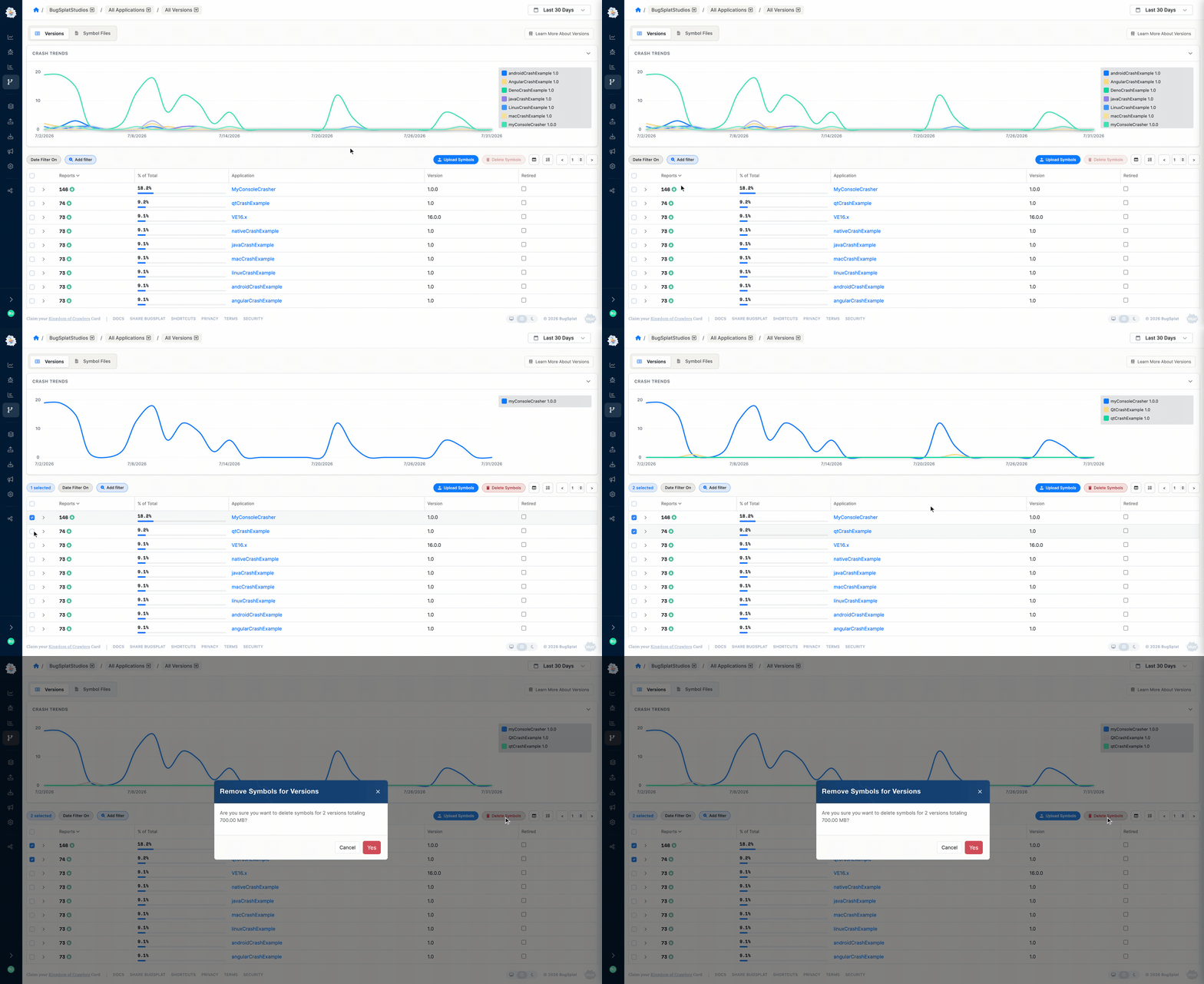
You can remove symbol stores at any time from the [Versions](https://app.bugsplat.com/v2/versions) page. Select the checkbox next to the versions containing the symbols you want to remove, then click the **Delete Symbols** button. The application name/version row won't be deleted, but it will show a size of zero.
Removing Symbols Manually
You can also remove a symbol store from your build machine by invoking [symbol-upload](/guides/working-with-symbol-files/upload-symbols-with-symbol-upload.md) with the `-r` flag.
### Managing Symbols with the API
If BugSplat's automatic cleanup rules aren't optimal for your team, you can implement your own cleanup logic using the [BugSplat API](/api-reference/api.md).
### Best practices for managing symbol space
* **Assign a unique version to each build.** This lets BugSplat's automatic cleanup rules remove symbols specific to builds that are no longer referenced.
* **Upload only the symbols you need.** BugSplat automatically de-duplicates identical symbol files across builds, so there's no need to prune duplicates yourself, but skip third-party, system, or game editor symbols you'll never need call stacks for.
* **Monitor symbol usage.** Keep an eye on the size of your symbol data and how often symbols are accessed so you can anticipate when automatic cleanup will occur.
* **Use manual removal when needed.** Periodically review your symbol stores and delete those you no longer need.
---
# Agent Instructions
This documentation is published with GitBook. GitBook is the documentation platform designed so that both humans and AI agents can read, navigate, and reason over technical content effectively. Learn more at gitbook.com.
## Querying This Documentation
If you need additional information that is not directly available in this page, you can query the documentation by asking a question.
Perform an HTTP GET request on the following URL with the `ask` and `goal` query parameters:
```
GET https://docs.bugsplat.com/guides/working-with-symbol-files/managing-symbol-storage.md?ask=&goal=
```
`ask` is the immediate question: it should be specific, self-contained, and written in natural language.
`goal` is what the user is ultimately trying to achieve, the reason they need the answer. Sharing it helps GitBook give you a better, more relevant answer. A goal is most helpful when it describes the outcome the user wants rather than restating the question. For example, with `ask=how do I create an API token`, a goal like `automate deployments from our CI pipeline` lets GitBook tailor the answer to that use case.
The response will contain a direct answer to the question and relevant excerpts and sources from the documentation.
Use this mechanism when the answer is not explicitly present in the current page, you need clarification or additional context, or you want to retrieve related documentation sections.