> For the complete documentation index, see [llms.txt](https://docs.bugsplat.com/llms.txt). Markdown versions of documentation pages are available by appending `.md` to page URLs; this page is available as [Markdown](https://docs.bugsplat.com/guides/working-with-symbol-files/symbol-servers.md).
# Symbol Servers
BugSplat can process crashes using symbol files stored in external symbol servers. BugSplat supports accessing HTTP/HTTPS servers and Amazon S3 Buckets. BugSplat caches files from external symbol servers, ensuring fast crash calculation. Please note that if BugSplat requests a file not present on your external symbol server, it will not try to access the file again for 6 hours. See [Miss-Cache](#miss-cache) below.
{% hint style="info" %}
Some organizations restrict access to their symbol servers by IP address. To allow access to BugSplat, add the IP addresses [23.22.79.2](https://www.whatismyip.com/23.22.79.2/?iref=home), [3.93.104.250](https://us-east-1.console.aws.amazon.com/ec2/home?region=us-east-1#ElasticIpDetails:AllocationId=eipalloc-0da0d84b88eed6812), and [34.194.164.107](https://us-east-1.console.aws.amazon.com/ec2/home?region=us-east-1#ElasticIpDetails:AllocationId=eipalloc-0cd966956c064a2e4) to your whitelist.
{% endhint %}
### Miss-Cache
If BugSplat processes a crash that needs a symbol file your external symbol server doesn't have yet (or refuses to deliver for any other reason), BugSplat records that miss and won't ask your server for that file again for 6 hours. This keeps a burst of crashes referencing an unavailable symbol from turning into a request storm against your server.
The trade-off shows up when symbols arrive shortly after the crashes do. If you've recently uploaded symbols and call stacks still aren't resolving, the miss-cache is a likely culprit. Navigate to the [Symbols](https://app.bugsplat.com/v2/database/symbols) page, expand your symbol server's row, and click **Clear Miss-Cache**. BugSplat will report how many entries it dropped and will request those files from your server again on the next lookup.
Clearing the miss-cache for an external symbol server
Clearing the miss-cache only affects future symbol lookups. Crashes that were already processed without symbols need to be [reprocessed](/education/how-tos/reprocessing-crashes.md) to pick up the newly available symbol files.
### Directory Structure
The [symbol-upload](/guides/working-with-symbol-files/upload-symbols-with-symbol-upload.md) tool can be used to create a [SymSrv](https://learn.microsoft.com/en-us/windows/win32/debug/symbol-servers-and-symbol-stores) directory structure for Windows and Xbox symbols that is compatible with both BugSplat and [Microsoft Visual Studio](https://learn.microsoft.com/en-us/visualstudio/debugger/specify-symbol-dot-pdb-and-source-files-in-the-visual-studio-debugger?view=vs-2022#configure-location-of-symbol-files-and-loading-options). Additionally, symbol-upload can also create a SymSrv directory structure for macOS/iOS, Linux/Android (Crashpad), PlayStation, and Nintendo Switch 2 symbols that is compatible with BugSplat.
To upload symbols to a local directory, provide the `-l` flag and a path where the symbols will be copied.
```bash
symbol-upload -f "**/*.{pdb,exe,dll}" -l "C:\path\to\output"
```
### HTTPS
BugSplat can access symbol files over HTTPS. This method also supports [Windows SymStore/SymProxy](https://learn.microsoft.com/en-us/windows-hardware/drivers/debugger/symbol-stores-and-symbol-servers) symbol servers. To connect an HTTPS symbol server to BugSplat, navigate to the [Symbols](https://app.bugsplat.com/v2/database/symbols?) page. Click the **+ Add Server** button, and add a **Host** value.
For symbol servers hosted on Azure, you'll need to generate a [Personal Access Token](https://learn.microsoft.com/en-us/azure/devops/organizations/accounts/use-personal-access-tokens-to-authenticate?view=azure-devops\&tabs=Windows#create-a-pat) that has the **Symbols (read)** scope. Enter your **Username** and use the PAT for **Password**. Optionally, you may test the connection to your server by providing a path relative to the **Host** URL.
When testing a path, BugSplat will make a **HEAD** request to **http\[s]://username:/path/to/test.pdb**. Please ensure your server accepts **HEAD** requests with Basic Authentication to access this path.
### AWS S3
For AWS S3 symbol servers, create a minimally permissive [IAM User](https://docs.aws.amazon.com/IAM/latest/UserGuide/id_users_create.html#id_users_create_console) so BugSplat can access your S3 bucket. Modify this example policy and attach it to your newly created IAM User.
```json
{
"Version": "2012-10-17",
"Statement": [
{
"Sid": "VisualEditor0",
"Effect": "Allow",
"Action": [
"s3:GetObject",
"s3:ListBucket"
],
"Resource": [
"arn:aws:s3:::{your-s3-bucket}",
"arn:aws:s3:::{your-s3-bucket}/*"
]
}
]
}
```
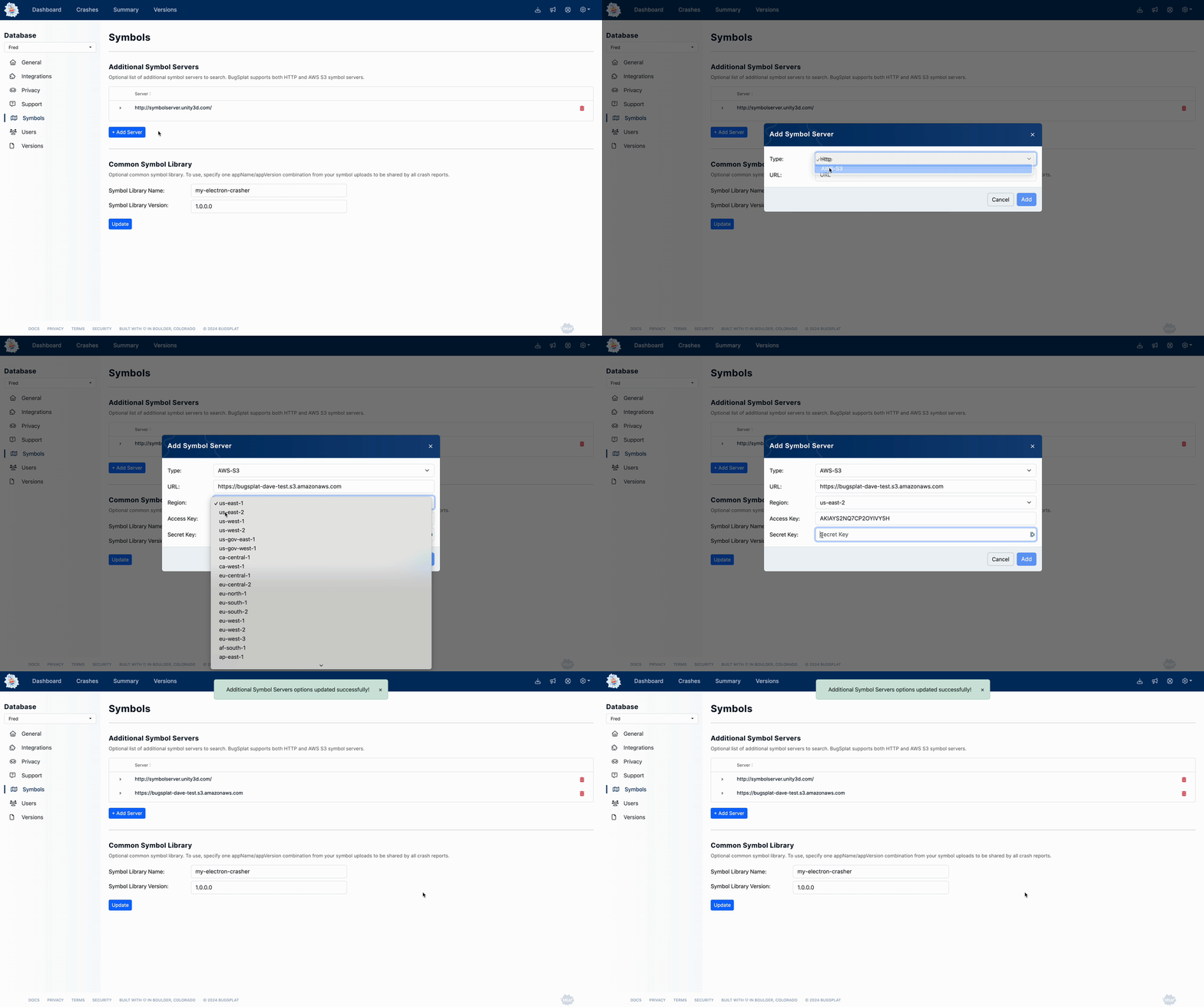
Once you create your IAM user, generate an [access key/secret](https://docs.aws.amazon.com/IAM/latest/UserGuide/id_credentials_access-keys.html) to allow BugSplat to access your S3 bucket. Navigate to the [Symbols](https://app.bugsplat.com/v2/database/symbols) page and click **+ Add Server**. Select **AWS-S3** in the **Type** dropdown. Enter values for **Access Key**, **Secret Key**, **Region**, and **Bucket Name**, and click **Add.**
Adding an External S3 Symbol Server
---
# Agent Instructions
This documentation is published with GitBook. GitBook is the documentation platform designed so that both humans and AI agents can read, navigate, and reason over technical content effectively. Learn more at gitbook.com.
## Querying This Documentation
If you need additional information that is not directly available in this page, you can query the documentation by asking a question.
Perform an HTTP GET request on the following URL with the `ask` and `goal` query parameters:
```
GET https://docs.bugsplat.com/guides/working-with-symbol-files/symbol-servers.md?ask=&goal=
```
`ask` is the immediate question: it should be specific, self-contained, and written in natural language.
`goal` is what the user is ultimately trying to achieve, the reason they need the answer. Sharing it helps GitBook give you a better, more relevant answer. A goal is most helpful when it describes the outcome the user wants rather than restating the question. For example, with `ask=how do I create an API token`, a goal like `automate deployments from our CI pipeline` lets GitBook tailor the answer to that use case.
The response will contain a direct answer to the question and relevant excerpts and sources from the documentation.
Use this mechanism when the answer is not explicitly present in the current page, you need clarification or additional context, or you want to retrieve related documentation sections.